Effective CNC router dust extraction depends on three things working together: capturing chips where the cutter creates them, keeping a clear path for air and debris to travel, and dealing with the chip form produced by the actual cut. A larger dust collector cannot automatically correct a hood that is too open, a hose that collapses during gantry travel, or chips that never enter the capture zone.
On a PS-2030 installation, extraction should therefore be reviewed as part of the complete machine setup rather than as an isolated accessory. The CNC Wood Router model page provides the machine-level reference, while the fitted dust shoe, flexible hose, duct route, cutter, material and dust collector still need to be assessed on the actual installation.
The most useful troubleshooting question is not simply “Do we have enough suction?” It is “Where do chips stop being captured or transported?” That question leads to a much more useful inspection.
Read the extraction problem as a path
01 Cut Where are the chips thrown?
02 Capture Do they enter the dust shoe?
03 Transport Do they keep moving through the hose?
04 Collect Is the downstream path remaining clear?
Capture at the Cutting Zone
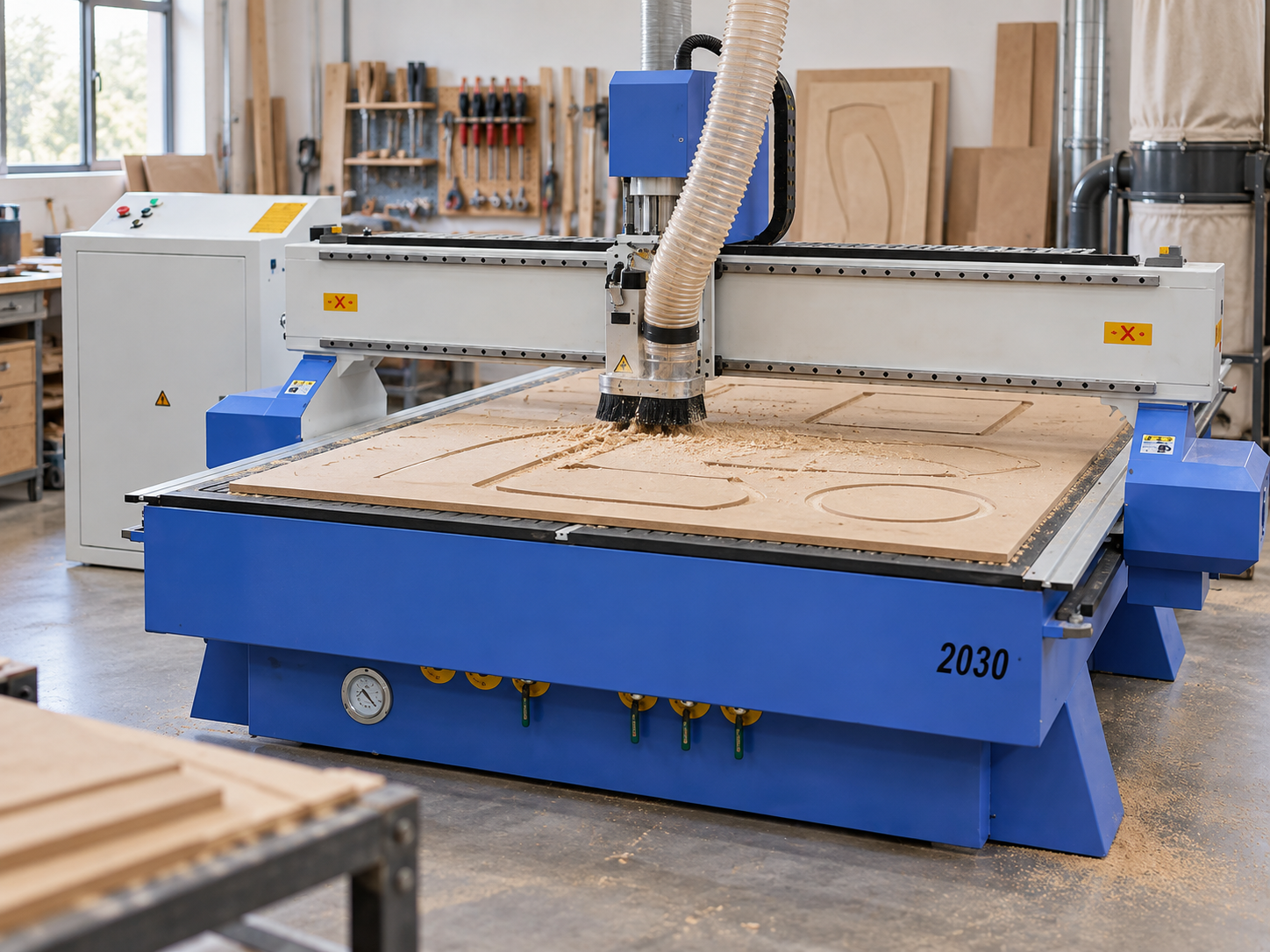
A dust collector cannot remove material that never reaches its inlet. That makes dust hood position one of the first things worth looking at when chips remain on the table or stay packed inside a routed groove.
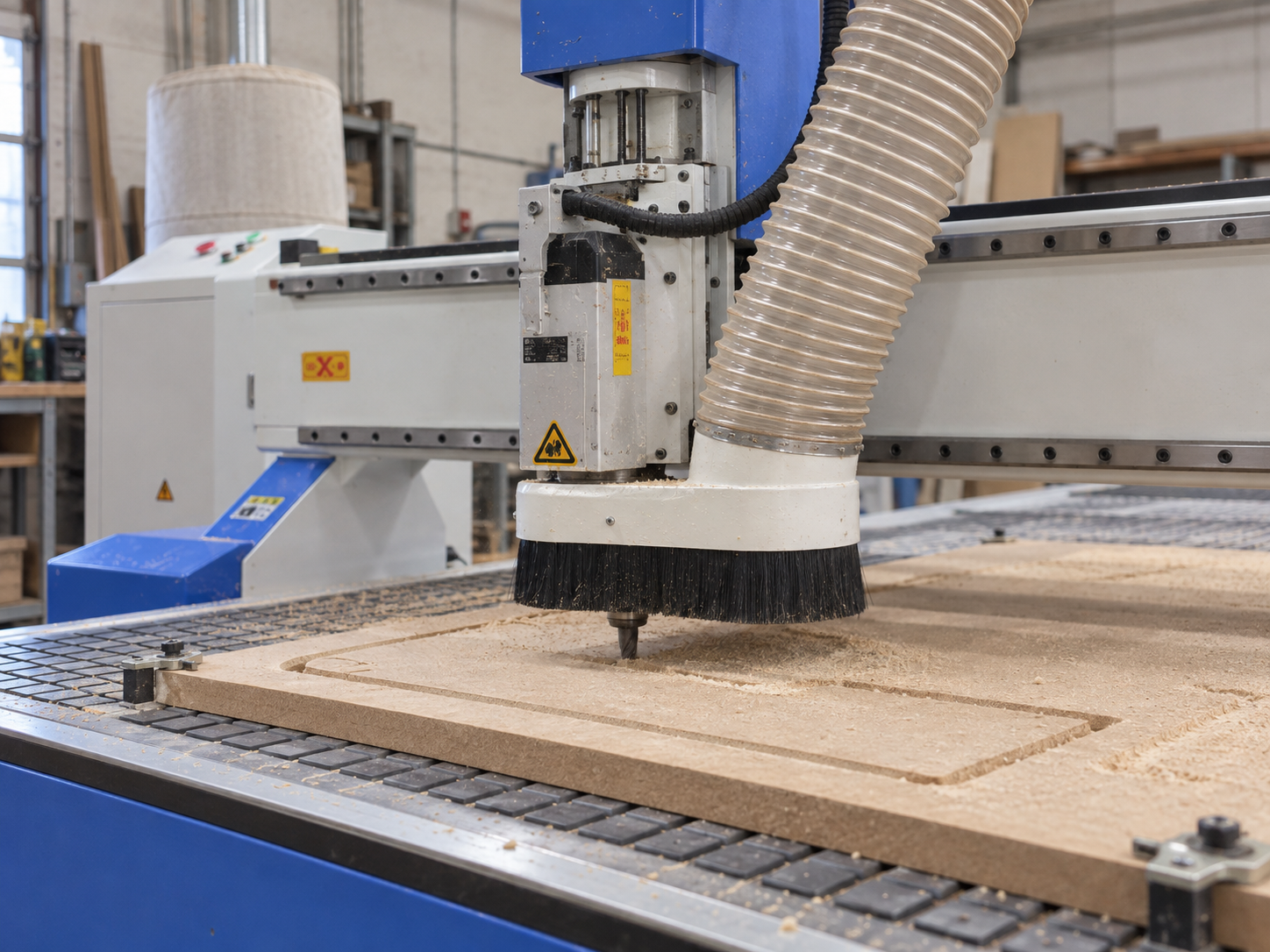
The dust shoe needs to surround the active cutting area closely enough to intercept the chip stream, while still allowing the cutter, workpiece, clamps and machine movement to remain clear. Raising the shoe excessively creates a larger uncontrolled opening. Air may still be moving into the hose, but much of it can enter from around the brush rather than carrying chips away from the cutter.
Moving the shoe lower is not automatically the answer either. The brush skirt can drag heavily across the workpiece, deform around fixtures or open up in an unexpected direction. The useful position is the one that contains the chip stream without interfering with safe machining, verified on the actual job.
Capture starts at the cutter. Observe whether chips actually enter the dust shoe as they leave the tool rather than judging extraction only by suction felt farther up the hose.
Watch the chip stream, not only the brush position.
If debris repeatedly leaves through one side of the shoe, record that direction. Cutter rotation, tool geometry, cutting direction and workpiece geometry can all influence where chips travel. A centred-looking hood can still have an ineffective opening in the direction the debris is actually moving.
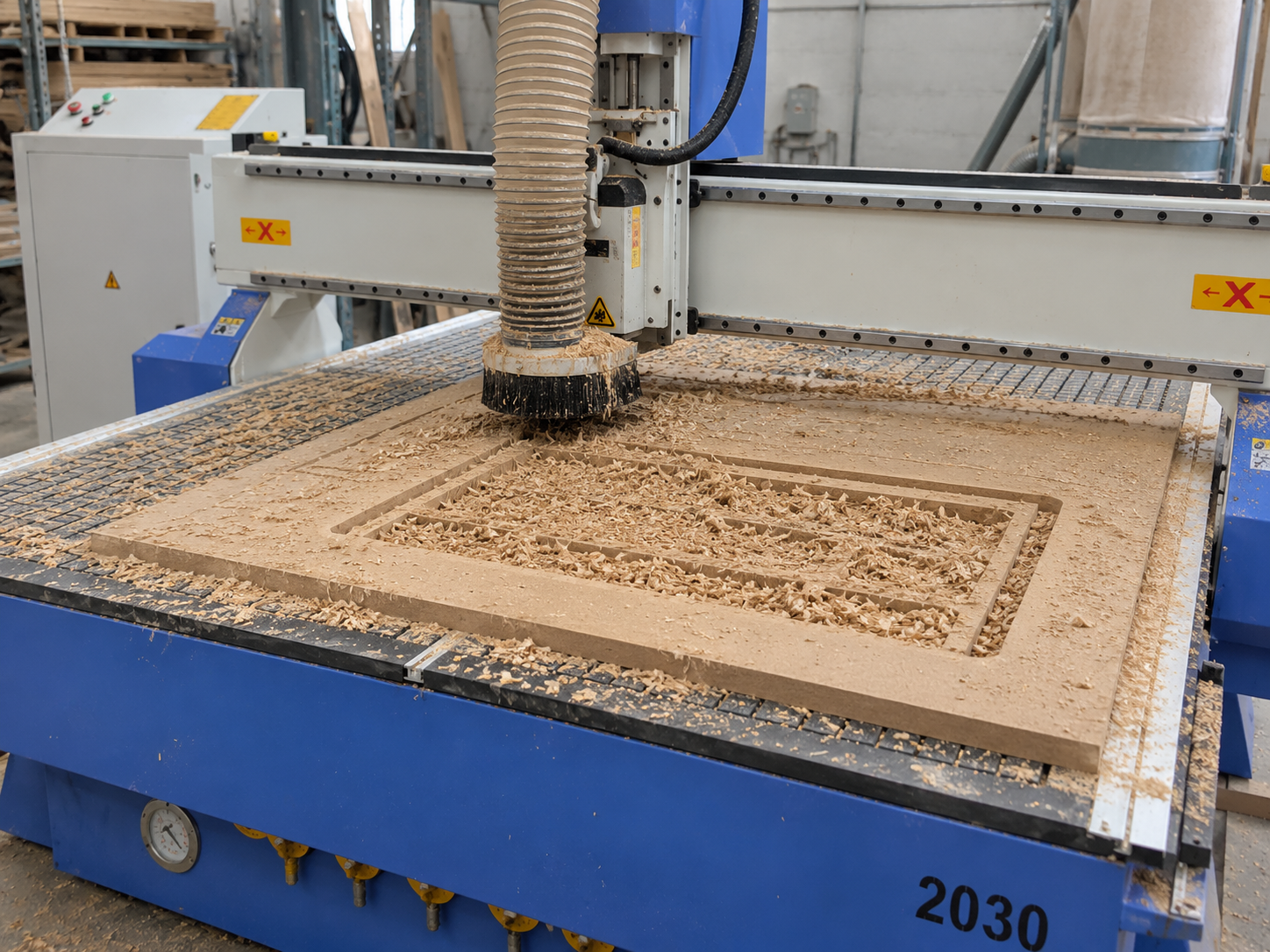
Deep pockets and enclosed slots introduce another problem. Air can move strongly across the top of the workpiece while chips remain below the most effective capture zone. If the groove stays full while the surrounding table remains relatively clean, the geometry of the removal path deserves attention before the collector is blamed.
Airflow vs Restriction
Good CNC router dust collection depends on useful airflow reaching the hood. Hearing the collector run does not prove that the same airflow is available where chips are being generated.
Flexible hose, internal corrugations, long runs, tight bends, abrupt transitions, partially obstructed joints and accumulated debris can all add resistance. A loaded filter or another downstream maintenance condition can also influence system performance. The effect depends on the complete installation, so a fixed airflow figure should not be treated as a universal answer without the relevant equipment information and measurement conditions.
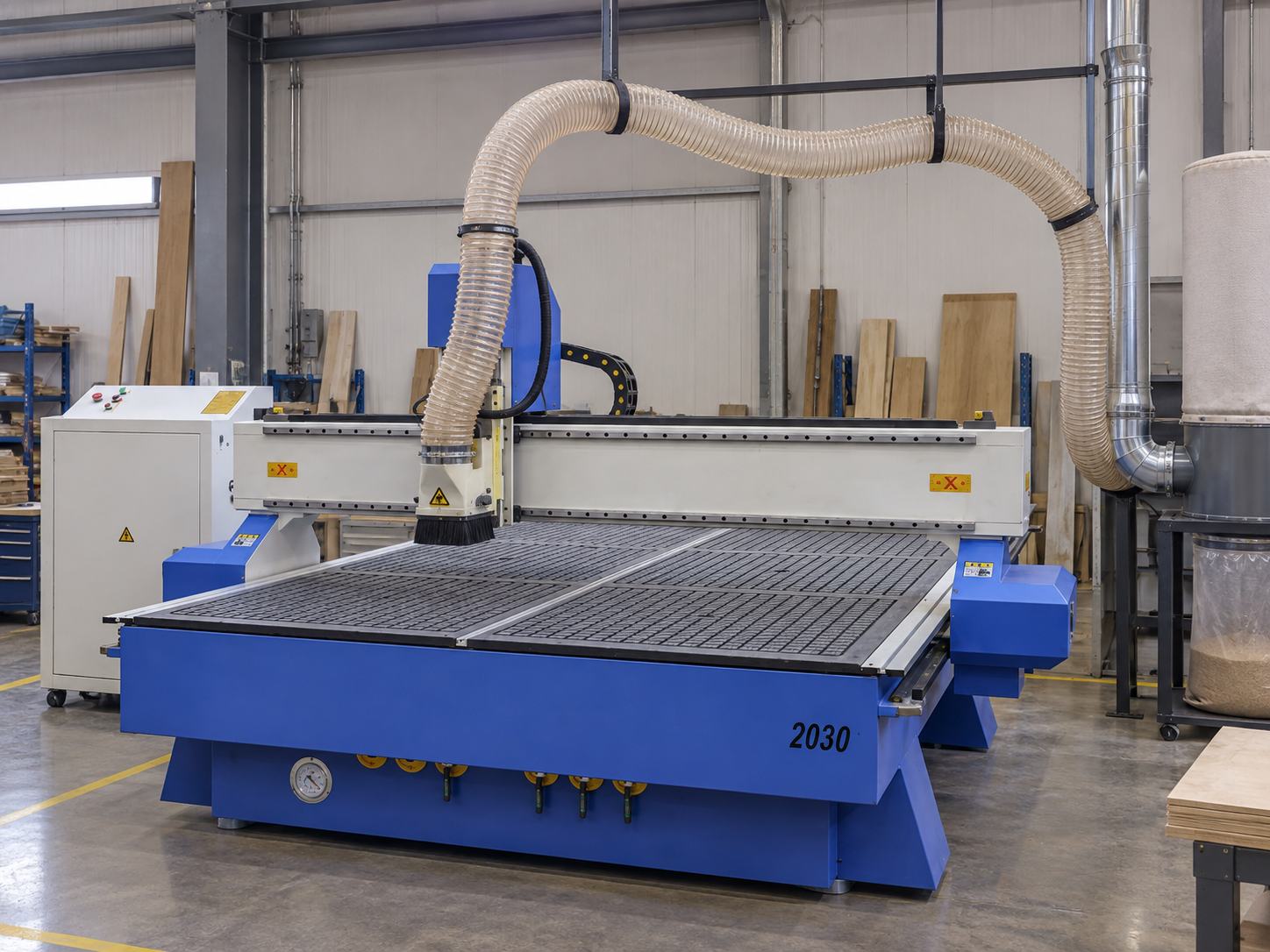
Flexible hose deserves particular attention because its shape changes with the machine. A route that appears open while the spindle is parked can sag, stretch, flatten or pull tight when the gantry moves elsewhere on the table. Inspect it through representative working positions rather than from one convenient viewing angle.
Read the route from the spindle outward: dust shoe, flexible hose, bends and downstream connection. A restriction at any point can reduce useful capture at the cutter.
This is why dust collector ducting should be treated as a complete airflow path rather than judged from one diameter alone. The installed collector, duct layout, machine travel and maintenance condition all matter.
Workshops comparing machine options can view the broader CNC Router Machines category before moving to a specific model such as the PS-2030. The extraction layout itself should still be confirmed against the actual machine and collector being installed.
Chip Type and Removal Path
Chip behaviour changes what the extraction system has to capture. Larger chips have more momentum and can travel beyond the hood opening before airflow redirects them. Fine particles may follow moving air more readily, yet they can also escape through open areas around the shoe. Longer or fibrous debris can bridge across an outlet or begin an obstruction where the hose or duct changes direction.
Tool geometry, tool condition and cutting parameters influence the debris produced by the operation. A clean chip, fine powder and compacted material inside a slot place different demands on the extraction path. Those observations are useful diagnostic evidence, but they do not prove by themselves that the collector is too small or that a larger duct is required.
The most valuable clue is often where the material stops moving. That separates a capture issue from a transport issue.
Chips outside the shoe
Look first at the capture opening, brush condition and direction in which debris leaves the cutter.
Chips inside a groove
Air may be passing above the debris without reaching the lower part of the toolpath effectively.
Chips inside the hose
Capture is occurring, so the investigation moves toward transport, hose shape and downstream restriction.
Build-up at a bend
The change in direction may be exposing a local restriction or a place where debris repeatedly collects.
Thinking in these terms makes router chip removal easier to diagnose. Instead of labelling every poor result as “weak suction”, the workshop can identify the stage where the removal path breaks down.
Duct and Hood Inspection Sequence
Start by observing chip movement from a safe operating position, with the machine’s guards and protective measures in place. Before touching the dust shoe, clearing a blockage or opening any hose or duct connection, stop the machine and isolate the relevant equipment according to the manufacturer’s instructions. Then trace the evidence from the cutting zone towards the collector rather than assuming the largest component must be at fault.
Look at the cut before cleaning it
Run a suitable repeatable cut and watch where chips first travel. Record whether they move into the shoe, leave one side or remain inside the toolpath.
Move to the hood outlet
Inspect the brush skirt, gaps around the workpiece and the transition immediately above the shoe. Material collecting here means the problem has already moved beyond simple chip capture.
Follow the flexible hose through machine travel
Look for sections that sag, compress, flatten or become sharply bent as the spindle and gantry move. A restriction that appears only at one end of the working area can otherwise be easy to miss.
Inspect bends, joints and section changes
These are useful places to look for debris build-up, damaged hose walls, leaks or a partial obstruction. Do not assume that chips entering the hose are reaching the collector successfully.
Review the collector side, then repeat the same cut
Check collection and filtration condition according to the actual collector documentation. After any correction, repeat the same job and compare the residue pattern instead of relying only on how strong the hose feels by hand.
Dust Extraction Check Sheet
Extraction problems become harder to solve when several things are adjusted at once. Use one record for the problem job, photograph the original chip residue, make one relevant change and repeat the same cut.
The sheet below is designed to capture observations rather than prescribe universal settings. Correct airflow, duct dimensions and collector requirements remain dependent on the actual equipment and installation.
Inspection Point
Record
Check For
Dust hood position
Position relative to cutter and work surface
Excessive opening, interference, damaged or uneven skirt
Hood outlet
Visible condition immediately above shoe
Compacted chips or a restricted transition
Duct / hose size
Installed diameter and changes along route
Abrupt transitions or visibly restricted sections
Flexible hose route
Length, loops, sagging and gantry position
Kinking, flattening, collapse or excess hose
Bends and joints
Position and accessible internal condition
Chip build-up, leaks or partial blockage
Collector / filter
Maintenance and loading condition
Downstream condition that may increase restriction
Chip residue
Exact location immediately after test cut
Capture failure, trapped debris, transport failure or fall-back
Change one thing, then repeat the same job.
Lowering the hood, rerouting the hose and changing collector settings at the same time may produce a cleaner result, but it will not reveal which change mattered. A controlled comparison is more useful for both troubleshooting and future setup work.
Signs of Poor Extraction
Do not clean the machine before looking at the pattern. The position of remaining chips often tells more than the total quantity alone.
A large dust cloud is an obvious warning, but poor extraction can also show up as repeated chip cutting, grooves that remain packed, fine debris spread across the finished surface or material that enters the hose and later falls back. However, a clean-looking cutting area does not necessarily mean fine airborne dust is adequately controlled. Chip residue is useful for troubleshooting, but dust exposure control also depends on effective extraction, filtration and appropriate system performance checks.
Chip residue after machining is useful diagnostic evidence. Note whether debris remains inside the toolpath, gathers around the shoe, spreads beyond the capture area or appears farther downstream before cleaning the machine.
Chips stay inside the groove
Airflow may be moving efficiently above the workpiece while the lower part of the slot remains outside the strongest capture path. Recutting then breaks retained chips into finer debris and can make the finished area look more contaminated than the initial cut would suggest.
Debris consistently escapes beyond one side of the shoe
Look at the direction of chip throw, the local brush opening and workpiece geometry. A repeated direction is more useful evidence than a general impression that the shoe is “not sucking enough”.
Chips enter the hose but stop farther along the route
At this point, lowering the shoe again is unlikely to address the main problem. The investigation should move toward sagging hose, bends, section changes, internal build-up and the downstream collector condition.
Performance changes suddenly on a previously stable job
A sudden change is a useful clue. If the same job previously removed chips acceptably, inspect for a new obstruction, hose deformation, altered routing, changed hood position or collector maintenance condition before assuming that the complete extraction system must be replaced.
Plan Extraction Before the Router Is Installed
Dust extraction is easier to integrate when it is considered during the machine and workshop layout stage rather than after the router has already been positioned. The decision should not begin with a generic duct diameter or the largest collector available. It should begin with the actual cutting setup and the route available for chip removal.
If a PS-2030 is being evaluated for a workshop, review how the extraction arrangement will work around the intended jobs. The machine model alone does not determine the correct dust collector, hose or duct specification.
Before confirming the setup
Make sure the extraction path can work with the real production layout
The useful question is not simply whether a dust collector can be connected. It is whether the complete capture and transport path can remain practical as the machine moves and as tooling, workpiece height and job geometry change.
How will the dust shoe sit around the cutter during representative work?
Can the flexible hose move through normal machine travel without pulling tight or collapsing?
Where will bends, transitions and the main collector connection be positioned?
Can likely blockage points remain accessible for inspection?
What collector information must be confirmed before the final duct arrangement is approved?
What to Send for PS-2030 Review
A useful extraction review needs more than a photograph of dust on the table. The objective is to separate a cutting-zone problem from a hose, ducting or collector-side problem.
For a PS-2030 or another router model, send enough information to reconstruct what happens from the cutter to the collector.
Machine and cutting setup
PS-2030 or actual router model
Material being machined
Type of operation producing the problem
Cutter details available for the job
Whether the problem is constant or appeared after a change
Extraction evidence
Clear photograph of the dust hood in its cutting position
Flexible hose and duct routing photographs
Dust collector make/model or available equipment information
Visible bends, transitions and notable connections
Photograph of chip residue immediately after machining, before cleanup
State exactly where chips remain: inside the groove, around the dust shoe, on one side of the workpiece, inside the hose or farther downstream. That location usually provides more diagnostic value than describing the extraction as simply “strong” or “weak”.
Frequently Asked Questions
How far should the dust hood be from the cutter?
There is no single correct distance for every router setup. The hood needs to remain close enough to contain the chip stream while preserving safe clearance around the cutter, clamps, workpiece and machine movement. Verify the position on the actual job and use the relevant equipment documentation where model-specific limits apply.
Why is the dust collector running while chips still remain in the groove?
Air can be moving through the dust shoe without reaching chips trapped lower in the toolpath. Inspect hood position, groove or pocket geometry, chip direction and the downstream airflow path before assuming collector capacity is the only cause.
How do flexible hose and elbows affect extraction?
Corrugated flexible hose, excess length, tight bends, deformation and internal build-up can increase resistance in the airflow path. The practical effect depends on the full installed system, so inspect the actual routing rather than applying one universal airflow assumption.
When should blockage be checked before replacing the dust collector?
Check for blockage early when performance changes suddenly, chips begin collecting at a bend or transition, the hose changes shape during machine travel, or the collection and filtration side has not recently been inspected. A local restriction can reduce extraction at the cutter even while the collector is operating.
Why do chips enter the hose and then fall back?
Capture at the dust shoe may be working while transport farther downstream is restricted. Check for sagging hose, sharp bends, material collecting at transitions and other downstream restrictions to identify where the chips stop travelling.
Send the setup, not just the symptom
Build the Next Extraction Decision Around the Actual Machine
Send the PS-2030 or actual router model, machining material, cutter information, a clear photograph of the dust hood in its working position, the flexible hose and duct route, dust collector information where available, and photographs of the remaining chips before the machine is cleaned.
That evidence makes it possible to focus the next check on cutter-zone capture, hose or duct restriction, chip transport, collector condition or the planned installation. Fixed airflow or duct-size conclusions should only be made from the actual equipment information and site conditions.








One thought on “CNC Router Dust Extraction: Airflow, Hood Position and Chip Removal”