A laser-cut profile can look clean and still finish outside the required dimension. An external profile may come out undersize, while an internal opening can finish larger or smaller than intended. When the same error repeats, the relationship between the programmed path, the material removed by the beam and the finished edge deserves attention.
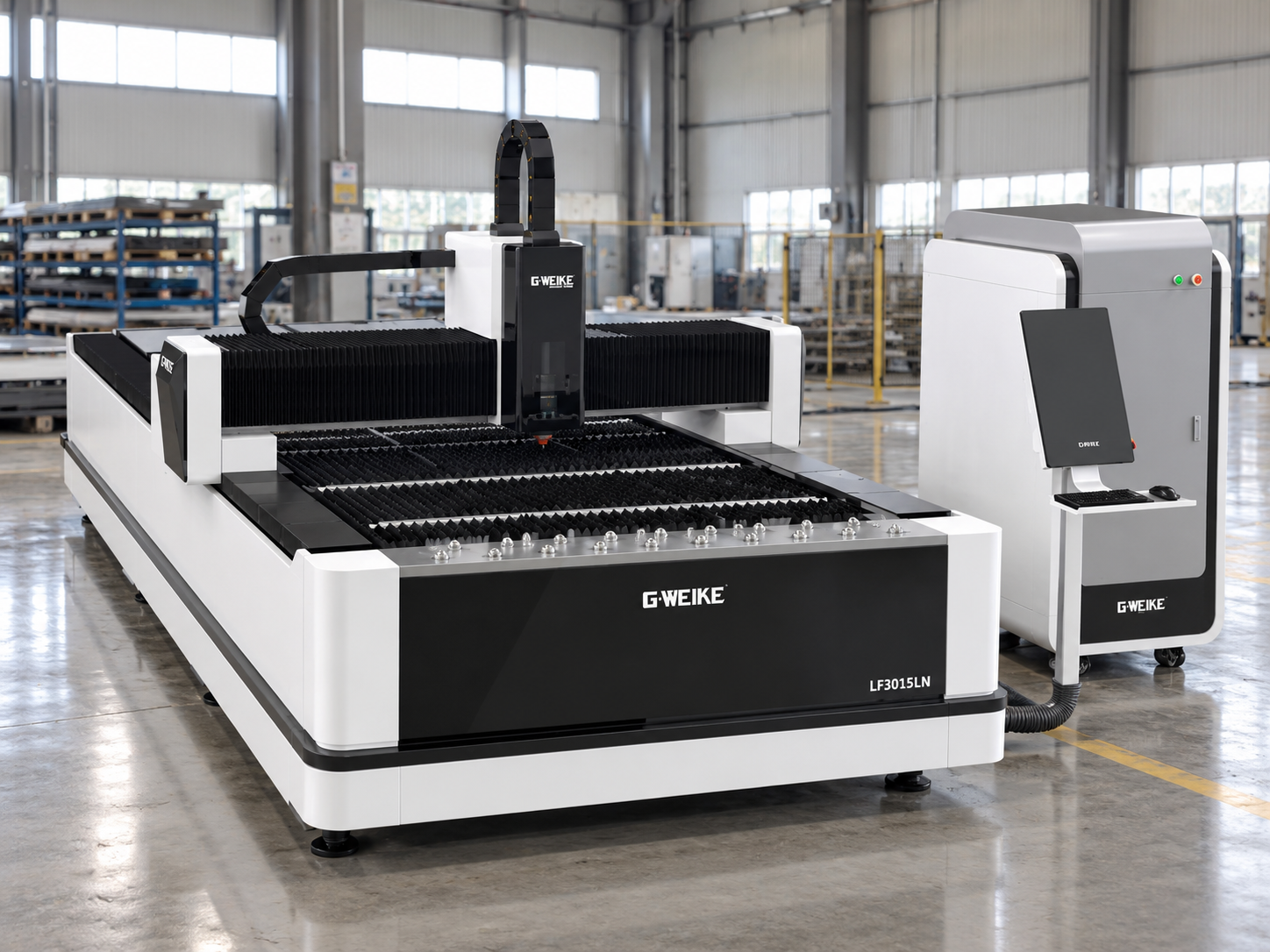
Laser cutting kerf compensation moves the cut path so the kerf falls on the correct side of the required boundary. For LF3015LN work, use the LF3015LN fiber laser cutting machine model page as the equipment reference. The actual compensation value should still come from measured cutting results and the installed control workflow, not from a universal number.
The practical objective is simple: measure a repeatable error, decide which side of the contour is waste, confirm where compensation is being applied, make one controlled adjustment and check whether the finished dimension moves in the expected direction.
Start with the dimensional symptom
Is the error stable enough to compensate?
Outside dimension repeats undersize
A repeatable external error is suitable for a controlled contour-offset test.
Hole or internal feature repeats off-size
Check the waste side before copying the same offset direction used for an outside profile.
The result changes every cut
Investigate process stability, movement, heat or measurement consistency before adding more offset.
Measure the Kerf Before You Compensate
A remembered kerf value is not a measurement. Laser kerf width can change when material, thickness, focus condition, cutting conditions or other process factors change. Even if a previous job used the same nominal material, its value is something to verify rather than an automatic starting point for finished-part dimensions.
A better starting point is a simple test feature produced under the same conditions intended for the dimensional check. Keep the cutting setup stable and use the same measurement method throughout the test. That way, a change in the result can be related to the path correction rather than to a different measuring location or a different cutting condition.
Measure the finished feature from a defined location before changing the compensation value. Keep the measuring method consistent across every retest.
Measure the finished geometry, not just a remembered process value
Kerf can be investigated by measuring a slit with an appropriate method, but for dimensional correction a known test profile often gives more useful information. It shows what matters to the drawing: where the finished edge actually ended up.
Where an uncompensated closed contour is used and both the removed coupon and the resulting opening can be measured consistently, the difference between them can also help estimate effective kerf along that axis. The method is only useful when both measurements refer to comparable locations on the cut.
Measured kerf and controller input are not automatically the same number.
A CAM package or controller may represent compensation as kerf width, radius, left/right offset or another system-specific value. Confirm what the installed system expects before translating a physical measurement into a setting.
Inside vs Outside Contours
The compensation direction depends on which side of the programmed boundary becomes the finished part. This is why inside outside contour compensation should be understood geometrically before anyone worries about a positive or negative sign.
Outside contour
Keep material inside the required boundary
Finished Part
Waste
On an external profile, the cutting centreline generally belongs on the scrap side of the required edge. The aim is to avoid removing material that should remain within the finished external dimension.
Inside contour
Put the kerf into the internal waste
Waste / Opening
Finished Part
For an internal opening, the waste is inside the feature. The required path movement therefore acts in the opposite physical direction from the outside profile.
Do not convert this directly into “plus for outside, minus for inside.” The sign can depend on contour direction and software convention. Determine the waste side first, then confirm how the actual system expresses the kerf offset setting.
Controller/CAM Compensation Logic
A cut path offset can be created in CAM before the program reaches the machine, or it can be applied later by the control system. The important question is not which method is universally better; it is whether the operator knows where the current correction is being applied.
Before changing a value, look at the workflow from drawing to toolpath to machine. If CAM already shifted the geometry and another offset is then added at the controller, the same contour may be compensated twice. The opposite mistake occurs when everyone assumes compensation exists upstream even though the programmed path still follows the nominal drawing.
1
Is the toolpath nominal or already offset?
Do not assume the programmed line still matches the drawing line.
2
Where is the active correction being applied?
Establish whether CAM, the controller or an intentional combination of both is responsible.
3
What does the input value actually represent?
Use the real controller or CAM documentation rather than borrowing a menu definition from another system.
For broader category-to-model context, the Fiber Laser Cutting Machines page provides the relevant equipment background. Compensation logic itself still needs to be verified against the installed machine and control workflow.
Compensation can reposition the programmed path, but the physical cutting process must remain stable enough for one test to be meaningfully compared with the next.
A Controlled Test Sequence
Once the process is stable enough to repeat the same error, resist the temptation to tune several variables at once. A dimensional test becomes useful when each new cut explains one change.
Baseline
Cut the feature before changing anything
Record the existing compensation and measure the target feature using a defined datum and inspection location.
Adjustment
Change only the relevant offset
Use a small correction in the physical direction indicated by the dimensional error and the controller’s confirmed compensation logic.
Retest
Cut the same geometry again
Keep material, thickness, program structure and established cutting conditions comparable to the baseline.
Decision
Follow the dimensional trend
Continue only while the dimension responds consistently in the expected direction. An unstable result is evidence to investigate something else.
Do not tune against one lucky part.
If a promising correction is going to become the new setup, repeat it. A second part that does not reproduce the first result is more useful as a troubleshooting clue than another larger offset.
Kerf Measurement & Offset Log
A compensation value is much more useful when it can be traced back to the test that produced it. The log does not need to be complicated. It only needs enough information to show whether the latest change actually improved the finished part.
What to record
What makes the record useful
Target + measured dimension
Record both numbers, not only the amount of error.
Contour type
Identify the feature as inside or outside before interpreting direction.
Kerf evidence
Note whether the value was directly measured or inferred from known geometry.
Compensation value
Save the baseline, the new value and which direction the path was moved.
Retest result
State whether the feature moved closer to target, stayed unchanged or became less stable.
Add the material and thickness, machine and control-system identification, measurement method and any process change made between tests. This prevents a value that worked under one condition from quietly becoming a supposed universal setting later.
If dimensional setup is being carried out on an LF3015LN, use the actual machine and its installed control system as the reference for how compensation is represented and applied. The useful workflow remains the same: measure the real cut, identify the contour type, confirm where the offset is being applied, change one variable and verify the finished part.
For a workshop assessing this model for production where finished dimensions matter, the buying discussion should go further than the machine name alone.
Confirm the controller and programming workflow.
The team setting up jobs needs to know where contour compensation will be managed.
Bring representative drawings and production material.
Dimensional requirements should be discussed around real parts rather than a generic kerf assumption.
Discuss setup and support expectations before purchase.
Confirm what information will be available when operators need help interpreting machine or control settings.
When Kerf Compensation Will Not Fix the Problem
Compensation is appropriate when the cutting process is stable and the finished edge is consistently displaced from where it should be. It becomes the wrong tool when the dimension itself is unstable.
A useful stopping rule
If a small, correctly directed offset change does not create a repeatable dimensional response, stop treating the offset as the only cause.
Focus or cut-condition instability
Changing edge behaviour can change the effective cut geometry. Stabilise the cutting process before trying to refine path position.
Mechanical or motion-related variation
An error that changes with axis direction, position or repeated movement deserves mechanical investigation rather than a larger global offset.
Thermal distortion
A mathematically correct path cannot restore a feature that moves or changes shape because of heat during or after cutting.
Workpiece movement
If the sheet or a partially released feature shifts, the physical material is no longer in the position assumed by the programmed contour.
Edge taper and measurement location
A measurement taken at one part of the cut edge may differ from another. Define the inspection location before comparing compensation tests.
Measurement variation
Burrs, datum choice, measuring pressure, instrument resolution and inconsistent inspection position can all create apparent dimensional movement that no path offset can correct.
What to Send for Dimensional Review
A useful dimensional review needs enough evidence to separate a path-setting problem from a process, mechanical or measurement problem. Sending only the final compensation value removes most of the context needed to judge what should happen next.
Machine + control system
Identify the actual machine and controller or software being used.
Drawing + target dimension
Show the feature being checked and its required finished dimension.
Actual measured dimension
Include the measured result and measurement location or datum.
Material + thickness
State the actual test condition rather than relying on a generic material value.
Contour + current compensation
Identify inside/outside geometry and where the current compensation is applied.
Cut-sample photographs
Include clear images of the feature and cut edge together with the test sequence.
When several tests have already been made, send them in order: baseline setting, measured result, adjustment and retest. That sequence makes it much easier to see whether the dimension is responding normally to compensation or whether another cause should be investigated.
Frequently Asked Questions
How should kerf be measured for compensation work?
Use a controlled test made from the same material and thickness under the intended cutting conditions. Measure the finished geometry consistently, or use a suitable kerf-measurement method, and record exactly where the measurement was taken.
Is the compensation direction the same for an internal hole and an outside profile?
No. The kerf needs to fall on the waste side of the finished boundary, and the waste lies on opposite sides for internal and external features. Confirm how the installed system represents that physical direction.
Is kerf fixed for the same laser cutting machine?
No universal fixed value should be assumed. Effective kerf can change with material, thickness, process conditions and machine condition, so dimensional work should be checked against the actual cutting setup.
When should I stop adjusting the offset?
Stop when offset changes no longer produce a stable and predictable dimensional response. At that point, investigate process stability, mechanics, thermal movement, workpiece movement and measurement repeatability.
Can compensation be applied in both CAM and the machine controller?
It can be part of a deliberate workflow, but the interaction must be understood. If CAM has already shifted the geometry, adding another unverified controller correction can move the same contour twice.
Ready for a dimensional review?
Send the Measurement Trail, Not Just the Final Offset
Confirm the machine and control system, then provide the drawing, target dimension, measured dimension, material and thickness, inside/outside contour identification, current compensation value and clear cut-sample photographs.
If you are troubleshooting an existing setup
Send the original value, each adjustment and the measurement produced by each test.
If you are evaluating a machine
Send representative drawings, normal materials and thicknesses, and the dimensional requirements that matter in production.
That information gives CNC Laser Durban a useful basis for discussing the machine, controller and next setup step without guessing a fixed kerf or offset value that may not match the real cutting condition.